Request-response oracle

circle-info

This guide provides step-by-step instructions for creating data requests to the NCFX API using the Request-Response Oracle system on the Canton blockchain. The guide assumes that the RequestFactory contract already exists and focuses on the request creation process using HTTP requests.

Overview

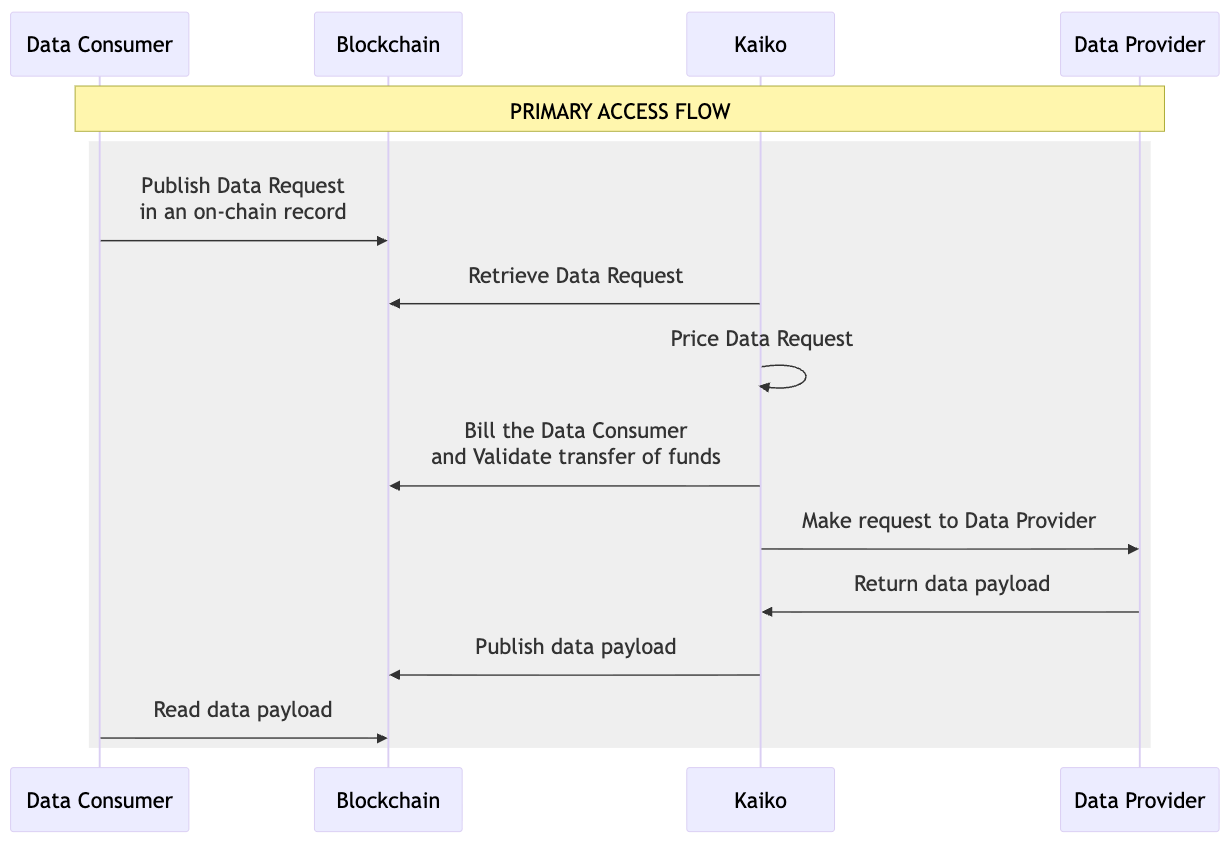
The request-response oracle enables secure requests for NCFX financial data through the Canton blockchain. The request creation process involves:

  1. Preparing request parameters: Gather NCFX data request

  2. Retrieving required contracts: Get Amulet rules and open mining round contracts

  3. Contract exercise: Submit the transaction to create a data request on the blockchain

Prerequisites

Required Information

You need the following information before starting:

  • Canton participant endpoint: URL of your Canton participant JSON API

  • Canton authentication token: Valid token for API access

  • Consumer party ID: Your party identifier in Canton (e.g., Consumer::1220...)

  • RequestFactory contract ID: Contract ID for the request factory

  • DSO Party ID: DSO party identifier

  • NCFX arguments:

    • Data request (stringified JSON)

  • Amulet contract ID: An Amulet contract for payment

  • Payment locked amount: Amount to lock for the request

Environment Setup

Ensure you have:

  • HTTP client capability (curl, fetch, requests library, etc.)

  • JSON parsing capability

  • Access to the Canton blockchain network

  • A canton node connected to the same domain as the oracle's node

  • Uploaded the Request-Response Oracle DAR file to your canton node

  • Sufficient Amulet balance for the request

Creating a Data Request

Prepare NCFX Request Parameters

Prepare your NCFX data request as a stringified JSON. Example:

Stringify the request (remove newlines and escape quotes):

Required Parameters:

  • dataRequest → Stringified NCFX data request

  • lockedAmount → Payment amount to lock

  • dso → The DSO party

  • amuletRulesCid → The official amulet rules current contract ID

  • openRoundCid → The current OpenMiningRound contract ID

  • inputs → A list of amulets YOUR_CONSUMER_PARTY owns

Submit Request Creation Transaction

Make a POST request to Canton to exercise the CreateRequest choice:

Request:

Request body:

The exerciseResult part in the response looks like:

Troubleshooting

A request can fail. In this case, the request contract is archived, and a FailedRequest is created. Here are the failing scenarios:

1. The locked amount does not cover the service amount

  • Cause: The lockedAmount you specified is less than the service fee charged by the oracle

  • Solution:

    • Increase the lockedAmount parameter in your request

    • Ensure you have sufficient Amulet balance

2. Stringified JSON request Data Is Not Valid

  • Cause: The dataRequest parameter is not a properly stringified JSON string

  • Solution:

    • Verify your JSON is valid before stringifying

    • Ensure all quotes are properly escaped (\")

    • Check that newlines are removed or escaped

    • Test your JSON with a validator before stringifying

3. NCFX Returns an Error When Sending the Request

  • Cause: NCFX's API returned an error when processing your request

  • Solution:

    • Check NCFX API status and availability

    • Verify your data request format matches NCFX's API requirements

    • Ensure requested fields and instruments are available in your catalog

    • Check NCFX rate limits haven't been exceeded

    • Review NCFX's API documentation for valid request formats

Reading the FilledRequest

Request processing

The oracle

  • detects your new request

  • proceeds to the payment by unlocking your amulet, taking the service amount needed from it and sending back to the consumer party the remaining amount

  • reads the Request contract

  • makes the request to NCFX on your behalf

  • archives the Data Request contract and writes the response data into a FilledRequest which fields look like:

Read the FilledRequest contract

Once the oracle has processed your request and received a response from NCFX, a FilledRequest contract is created. To retrieve it, you need to query the active contracts on the Canton ledger.

Query for FilledRequest contracts

Make a POST request to retrieve your FilledRequest contracts.

Request:

Request body:

Expected response:

Understanding the response

The response contains the FilledRequest contract with the following important fields in createArgument:

Contract fields:

oracle

The oracle party that processed the request

consumer

Your consumer party ID

requestId

NCFX request ID

requestData

The original request data you submitted (stringified JSON)

responseData

NCFX's response data (stringified JSON)

serviceAmountCharged

The actual service fee charged by the oracle

Service amount: The serviceAmountCharged shows the actual fee deducted from your locked amount. Any remaining amount from your locked amount is returned to you.

Last updated

Was this helpful?